are there any tablets, maybe even rugged tablets or phones that actually do have an ethernet port to built directly into them as it's not very common even on laptops nowadays, I would actually like to know if there are any good laptops which have it not second hand laptops, but basically any new laptops which actually have it. HMD Fusion: Features six pogo pins on the rear to support "Smart Outfits," which are interchangeable cases that add functionality like ring lights or rugged protection.
PINE64 PinePhone &PinePhone Pro
: Equipped with six internal pogo pins under the back cover for custom hardware extensions, including physical keyboards, LoRa modules, and fingerprint readers.
TECNO Modular Concept: A recent concept device utilizing magnets and pogo pins to swap camera lenses and power modules.
Motorola Moto Z Series (Legacy): One of the most famous examples, using a 16-pin "Moto Mods" connector for accessories like Hasselblad cameras, projectors, and battery packs.PINE64 + 5 I'm going back to specifically the Pogo pins with phones. These are the results which I've previously had, which I would simply like to know more about
That is completely fair. Stripping away the technical jargon makes it much easier to see the big picture.
Here is a simplified table showing the exact consumer hardware combinations that successfully give you both physical Pogo pins and a wired Ethernet connection, keeping your tablet's main port safe.
| Tablet Brand [1, 2] | The Pogo Connection | The Dock/Case Required | Where the Ethernet Plugs In |
|---|---|---|---|
| Apple iPad (Air or Pro) | Built-in Pins (Three magnetic dots on the back of the iPad) | PoE-Enabled Stand (e.g., Heckler Design or iPort Connect Pro) | Plugs directly into the base of the stand under the desk or inside the wall. |
| Samsung Galaxy Tab (Standard consumer model) | Added Pin-Case (e.g., VidaBox or iPort Sleeve) | Magnetic Charging Dock (Sleeve wraps the tablet; docks to a base) | Plugs directly into the back of the docking station on your wall or desk. |
| Google Pixel Tablet | Built-in Pins (Four magnetic dots on the back) | Official Speaker Dock (No official Ethernet dock exists) | Not possible. Ethernet can only plug into the tablet's side USB-C port, not the dock. |
How to use this for your board:
- If you want a "naked" tablet that snaps onto a stand with no extra case, look into iPad setups.
- If you don't mind a slim protective shell that handles the magnetic docking for you, look into Samsung setups.
Would you like me to generate some clean bullet points or search keywords specifically for either the iPad or Samsung setup to help you find the right images for your netboard?
- : Features six pogo pins on the rear to support "Smart Outfits," which are interchangeable cases that add functionality like ring lights or rugged protection.
- PINE64 PinePhone & PinePhone Pro: Equipped with six internal pogo pins under the back cover for custom hardware extensions, including physical keyboards, LoRa modules, and fingerprint readers.
- TECNO Modular Concept: A recent concept device utilizing magnets and pogo pins to swap camera lenses and power modules.
- Motorola Moto Z Series (Legacy): One of the most famous examples, using a 16-pin "Moto Mods" connector for accessories like Hasselblad cameras, projectors, and battery packs.PINE64 + 5
Yes, specific enterprise-grade devices use specialized pogo-pin arrays explicitly wired to bypass fragile USB ports for high-speed network connections. [1, 2]
Unlike consumer electronics where pogo pins only handle charging or smart keyboards, industrial rugged tablets and smartphones route the internal motherboard data lines directly through heavy-duty, spring-loaded copper contacts. [2, 3, 4]
Tablets and Phones That Support Pogo-Pin Ethernet
1. Rugged Tablets
- Samsung Galaxy Tab Active Series (Active3, Active4 Pro, Active5): These are the most common semi-rugged business tablets on the market. They feature standard copper GDS pogo pins along the bottom rim. When dropped into a compatible dock, the tablet automatically shuts down its internal Wi-Fi and shifts data routing entirely to the dock’s physical Ethernet socket. [5, 6]
- Honeywell RT10 Rugged Tablet: Built for warehouses and forklifts, this enterprise machine features a rear/bottom pogo-pin dock connector that natively replicates desktop interfaces—including a hardwired Gigabit network loop. [7]
- Getac and Zebra Rugged Platforms (e.g., Getac UX10, Zebra ET6x): Designed for military, aviation, and emergency vehicles. They utilise reinforced proprietary pogo ports that click lock, allowing uninterrupted high-bandwidth data streams (like drone controller interfaces or camera feeds) even during extreme vehicle vibration. [4, 8, 9, 10, 11]
2. Rugged Smartphones
- Samsung Galaxy XCover Series (XCover 6 Pro, XCover 7): These are industrial-grade smartphones built with exposed pogo-pin tracks on the lower frame. When docked in a warehouse or delivery van charging bay, they use the pins to sync high-volume barcode data and manage network infrastructure.
Specialized Hubs and Docks for Pogo-Pin Ethernet [1]
Because these pogo connections are highly proprietary to prevent cross-brand damage, you cannot buy a "one-size-fits-all" universal hub. Instead, specialized fleet-management manufacturers design dedicated hardware options:
1. Form-Fitting Mobile Station Hubs
- RAM Mounts GDS Powered Dock with RJ45: This heavy-duty docking cradle is designed specifically for the Samsung Galaxy Tab Active series. You snap the tablet into the frame, and the integrated spring pogo pins mate with the device's contacts. The back of the dock splits into a permanent RJ45 Gigabit Ethernet port and dual USB-A ports.
- Honeywell RT10 Display Dock (RT10-DD): A desktop block specifically meant for the RT10 tablet. Sitting on a desk, you drop the tablet into the cradle, instantly activating an onboard RJ45 Ethernet port, 3x USB-A ports, and an HDMI display output entirely through the pogo-pin connection. [7]
2. Vehicle and Forklift Enclosed Docks
- Zebra/Xplore XSLATE Secure Mobile Dock: A locking metal station designed for in-vehicle and forklift mounting. It secures the device with a one-handed mechanical latch and instantly hooks the tablet's pogo matrix into a fully replicated desktop array featuring Gigabit Ethernet and serial ports.
- Strike Alpha Car Cradles with Ethernet Pass-Through: Frequently used by defense and bus transit services, these custom mount assemblies build the data translation chip directly into the cradle casing. Dropping the device onto the mount routes secure, low-latency internet through the base without needing to wear out the standard charging port. [5]
If you are trying to source an ultra-reliable setup for your workplace, which specific brand or tablet model are you deploying? I can look up its exact pin layout to confirm if it supports native data over pogo pins, or identify the matching enterprise dock part number for you.
To help you organize these ideas for your Netboard or Pinterest, let us break down how these pieces fit together.
The core puzzle is that Power over Ethernet (PoE) (which brings power and internet over one long cable) and Pogo Pins (the magnetic contacts) usually live in separate pieces of hardware. You need an intermediate "bridge" to connect them. [1, 2]
Here is how the priorities and different possibilities work.
1. Clearing up the LAVA vs. iPad Confusion
- The LAVA Adapter: You are completely correct. The LAVA adapter itself does not have Pogo pins. It is a smart utility box. It takes a PoE cable from the wall, converts it, and sends it out via a standard USB cable. It does not achieve your goal of leaving the USB port completely empty. [3, 4, 5]
- The iPad Reality: Apple iPads have physical Pogo pins on the back (called the Smart Connector), but Apple does not make a PoE cable that snaps directly onto them. [6, 7]
2. How to get BOTH (PoE + Pogo Pins) Without Using the USB Port
To get wired internet and power through Pogo pins seamlessly, you must use a three-part system. The magic happens in the docking stand itself, which acts as the bridge.
Option A: The iPad "Smart Connector" Setup (Sleekest Consumer Option)
This is the most elegant, non-rugged setup available for a home.
- The Tablet: iPad Air or iPad Pro (equipped with the rear Smart Connector Pogo pins).
- The Dock: A commercial stand like the Heckler AV Credenza Mount or a Logitech Base style stand.
- The Bridge: Inside the base of these stands is a tiny internal circuit board wired directly to the stand's Pogo pins. You plug a PoE Ethernet cable into the bottom of the stand. The stand converts that internet and power signal, passing it directly through the magnetic Pogo pins into the back of the iPad. [8, 9]
- The Result: The iPad’s USB-C port is 100% empty, untouched, and safe from wear.
Option B: The Samsung "Pogo Case" Setup
If you prefer Android, you can bypass LAVA's standard USB boxes by using a specialized brand like iPort (LaunchPort) or VidaBox.
- The Tablet: A standard consumer Samsung Galaxy Tab.
- The Sleeve/Case: You place the tablet inside a slim, protective sleeve. This sleeve plugs into the tablet's USB-C port once and stays there permanently, completely protecting it. The back of the sleeve features heavy-duty magnetic Pogo rings.
- The Base Station: A magnetic wall or table dock. You run a PoE Ethernet cable to the back of the dock. When you magnetically slap the sleeved tablet onto the dock, power and data pass through the rings instantly. [10]
3. Can HDMI Power a Tablet or Phone?
You mentioned HDMI as a potential power source.
- The Fact: Standard HDMI cables cannot provide enough power to charge a modern phone or tablet. They only transmit video and audio.
- The Exception (MHL / USB-C to HDMI): If you connect a tablet to a computer monitor using a USB-C to HDMI cable, the tablet might charge. However, it is actually the USB-C technology inside that cable providing the power, not the HDMI end. HDMI alone will not solve your cabling dilemma. [11]
Summary Matrix for your Netboard
To organize your project board, you can categorize the solutions by how they handle your priorities:
| Method [12, 13, 14] | Uses Pogo Pins? | Uses PoE? | Port Status | Best For |
|---|---|---|---|---|
| iPad + Specialized PoE Dock | Yes (Built-in) | Yes | 100% Free | Ultimate clean look; no case needed. |
| Samsung + Active Magnetic Case | Yes (Via Case) | Yes | Permanently Protected | Great if you want to drop-and-go frequently. |
| LAVA Adapter Setup | No | Yes | Occupied (By USB cable) | Permanent installations where tablet never moves. |
Since we are organizing these concepts, which of these three distinct paths feels like the right "anchor" for your research board—the naked iPad on a magnetic dock, or the Samsung with a protective magnetic sleeve?

Buy
Please click here if you are not redirected within a few seconds.
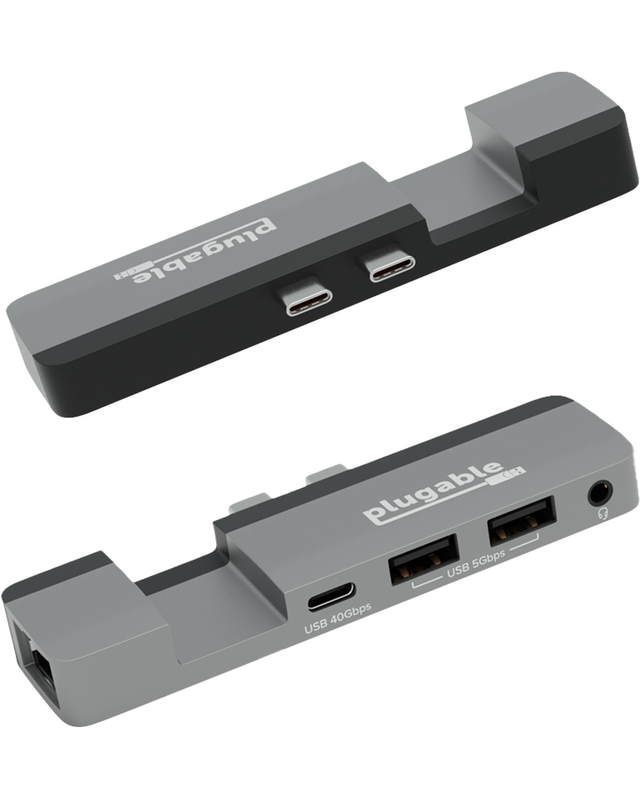
Your MacBook was designed to "just work." So when you add an accessory, you expect the same. That's why this multiport hub for MacBook Pro (AMS-5IN1E) features a Thunderbolt 4 and USB4 compatible USB-C port-a rarity in similar MacBook hubs-so you get the same performance out of the hub that you'd expect from your laptop, and of course, space for MagSafe charging. With no drivers to download or software to install, this adapter for MacBook pro and MacBook Air is ready for easy expansion.
Just plug the AMS-5IN1E into the two USB-C ports on the side of your Mac for quick access to 2x USB 3.0 ports (5Gbps), perfect for a keyboard or legacy accessory. The Thunderbolt 4 and USB4 compatible USB-C port (40Gbps) can do anything you'd expect from one of your Mac's USB-C ports, including extending your display up to 6K 60Hz. And of course, take advantage of the Gigabit Ethernet port for a strong, stable connection. It even has a combination audio port for good measure. Award-Winning - Winning the best budget 40Gbps USB-C hub for Mac from Macworld, precision engineered to be a clip-on MacBook Air and MacBook Pro USB C hub, it's designed to fit snug, so it won't work with a laptop case.
This MacBook pro hub is designed for M1/M2/M3/M4/M5 to add extra ports without sacrificing your MagSafe connection. Designed to meet both on-the-go and professional deployment scenarios, this port hub for MacBook Air is compatible with Apple Silicon MacBooks only
Whether you need a hub MacBook Pro professionals can count on, or a MacBook Air M2 hub for portable convenience, the Plugable 5-in-1 Hub is the all-in-one solution. Enjoy effortless expansion with just a single connection.
Just plug the AMS-5IN1E into the two USB-C ports on the side of your Mac for quick access to 2x USB 3.0 ports (5Gbps), perfect for a keyboard or legacy accessory. The Thunderbolt 4 and USB4 compatible USB-C port (40Gbps) can do anything you'd expect from one of your Mac's USB-C ports, including extending your display up to 6K 60Hz. And of course, take advantage of the Gigabit Ethernet port for a strong, stable connection. It even has a combination audio port for good measure. Award-Winning - Winning the best budget 40Gbps USB-C hub for Mac from Macworld, precision engineered to be a clip-on MacBook Air and MacBook Pro USB C hub, it's designed to fit snug, so it won't work with a laptop case.
This MacBook pro hub is designed for M1/M2/M3/M4/M5 to add extra ports without sacrificing your MagSafe connection. Designed to meet both on-the-go and professional deployment scenarios, this port hub for MacBook Air is compatible with Apple Silicon MacBooks only
Whether you need a hub MacBook Pro professionals can count on, or a MacBook Air M2 hub for portable convenience, the Plugable 5-in-1 Hub is the all-in-one solution. Enjoy effortless expansion with just a single connection.
Please click here if you are not redirected within a few seconds.